
B. Getting Started
Share the Assistant
Create a private share link so selected people can try your representative and give feedback before it goes live on your website.
By aninditoUpdated 6 Sep 2026
Before your representative appears on your public website, let other people interact with it first. A private share link lets selected people converse with it without installing anything.
Why this matters
Personal testing alone rarely catches everything. Different people notice different issues: unclear explanations, a tone that misses your brand, missing information, confusing guidance. A share link is a safe way to gather feedback before launch.
Create a share link
- Open your domain in Domain Center, then go to Settings > Channels & Integrations.
- Open Private Share Links.
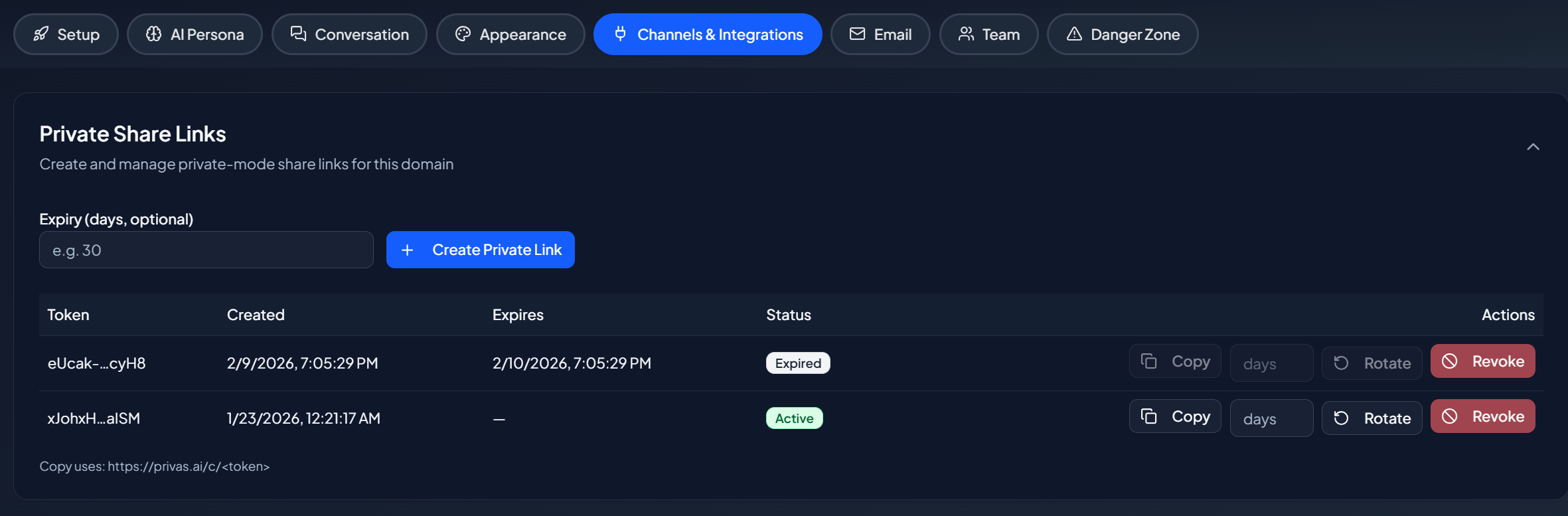
- Click Create Private Link and copy the link. It looks like:
https://privas.ai/c/xxxxxxxx
- Open it in any browser tab. Anyone with the link interacts with the representative exactly as a visitor would.
Updating your knowledge does not require a new link. The link always uses the latest version of your representative.
Options
You can set an expiry time, revoke access at any time, and rotate the link if needed.
Send it for review
Share the link with team members, support staff, product managers, or trusted customers. Ask them to try realistic questions and different phrasings, and to check clarity, tone, and accuracy.
Reviewers should check whether the representative explains things clearly, keeps a consistent tone, avoids guessing, asks for clarification when needed, and reflects how your company communicates.
Safety
The link does not expose your website, the representative is not publicly indexed, you can revoke the link at any time, and expired links stop working automatically.
Customize the share-link page
The share-link page has its own greeting, suggested-question wheel, and sidebar. Tune them in Share-link Experience.
Next step
Continue to Test the Representative to confirm it behaves correctly before installing it.