I. Integrations & Agent Access
Widget Kill Switch
Turn off the chat widget on your website in one click for an emergency, while your share links keep working. Re-enable it just as quickly.
Updated 6 Sep 2026
The widget kill switch turns off the chat widget on your website without removing the script or changing anything else. Use it when you need the widget to stop appearing quickly.
Where to find it
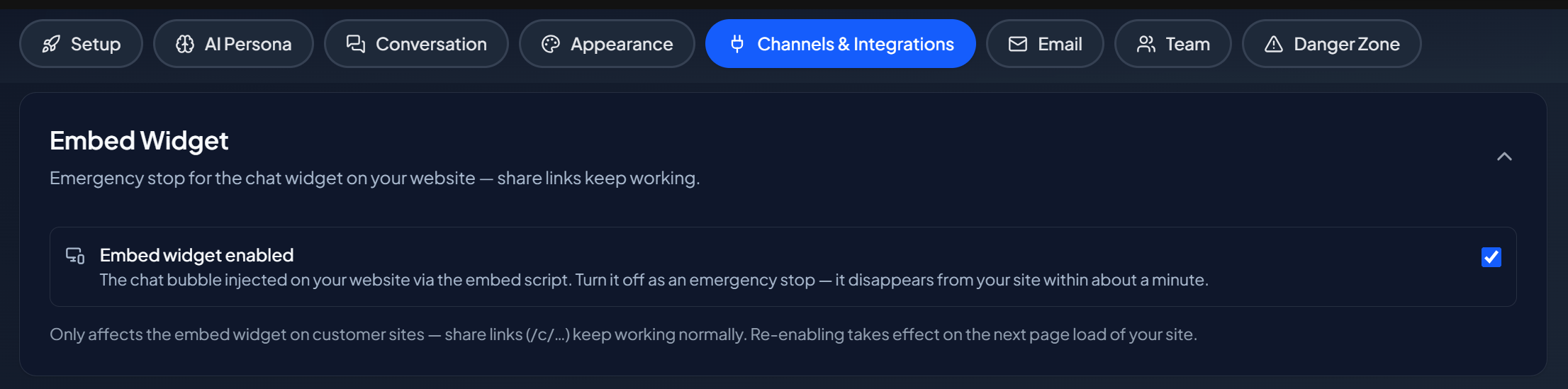
Open your domain, then go to Settings > Channels & Integrations > Embed Widget.
What it does
- Disabling hides the widget on your website. New page loads no longer show it.
- Enabling brings it back.
Your share links are not affected. They keep working while the widget is off, so you can still hand out a direct conversation link.
How quickly it takes effect
New page loads are gated right away. A page a visitor already has open re-checks periodically, so an open widget turns itself off shortly after you disable it.
A note on caching
Websites cache the widget script, so a returning visitor may hold an older copy for a while. The check that keeps the widget hidden runs on the Privas AI side, so a disabled widget stays quiet even when a cached script tries to load it.
When to use it
Use the kill switch for a temporary situation: a site maintenance window, an incident, or a pause while you rework your knowledge. For a permanent removal, take the script off your pages.
Next step
Continue to Plans & Billing to understand limits and your subscription.