
E. Conversation Management
Admin Take Over
Step into a live conversation and reply as a person. Taking over pauses the AI for that chat only, and the visitor sees when a human joins.
By aninditoUpdated 6 Sep 2026
Admin Take Over lets your team step into a live conversation and reply directly to the visitor. The AI stays available by default, so important discussions can be handled personally when needed.
When to take over
AI is efficient and consistent, but some conversations call for a person: final confirmation, negotiation, sensitive clarification, a sales or onboarding discussion, or a high-value client. Use takeover selectively for high-impact interactions.
How to take over
- Open the conversation from your dashboard, or from an escalation email link.
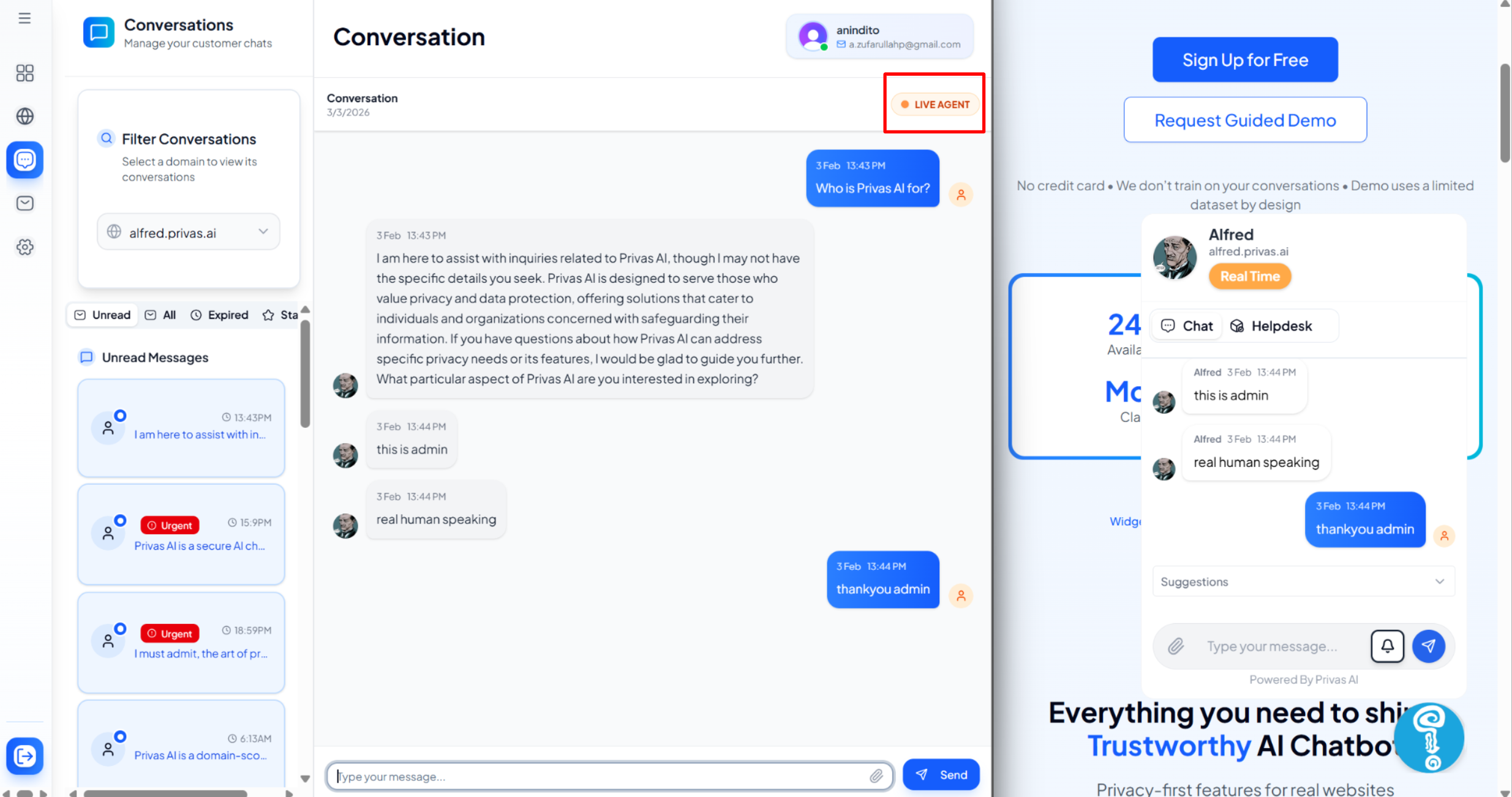
- Review the conversation history.
- Switch to Live Agent mode.
- Reply directly to the visitor.
Once Live Agent mode is on, your replies are sent as a human representative and the AI stops responding automatically in that conversation. This affects only the selected conversation, not other visitors.
What the visitor sees
The first time you take over on a domain, you set a display name. This is the only detail about you that reaches visitors; your email and account are never shown.
When you switch to Live Agent, the visitor's chat shows a marker that a team member has joined, and a divider line appears in the conversation. When you hand the conversation back to the AI, another divider marks the switch, so the visitor is never left guessing who they are talking to. The chat stays one continuous thread.
Handing back to the AI
Human involvement does not have to last the whole conversation. When the visitor's main issue is resolved and they return to general questions, switch back from Live Agent to AI Assistant. The AI resumes within its scope.
What this affects, and what it does not
Takeover changes who responds in that one conversation and how it feels to the visitor. It does not change AI training, modify knowledge sources, affect other conversations, or disable the widget.
Best practices
- Read the full history before replying.
- Keep your tone consistent with the assistant's persona.
- Use takeover for high-intent or sensitive cases.
- Avoid switching back and forth unnecessarily.
Next step
Continue to Conversation Context on Takeover to see exactly what your team reads before replying.