
M. AI Call
Voice Identity
Choose the voice visitors hear on a call, write the opening and closing lines, and list the names your assistant must recognise and say right.
Updated 19 Nov 2026
Voice identity decides who your visitors hear on a call. Open your domain, go to Settings > AI Call and open Voice identity.
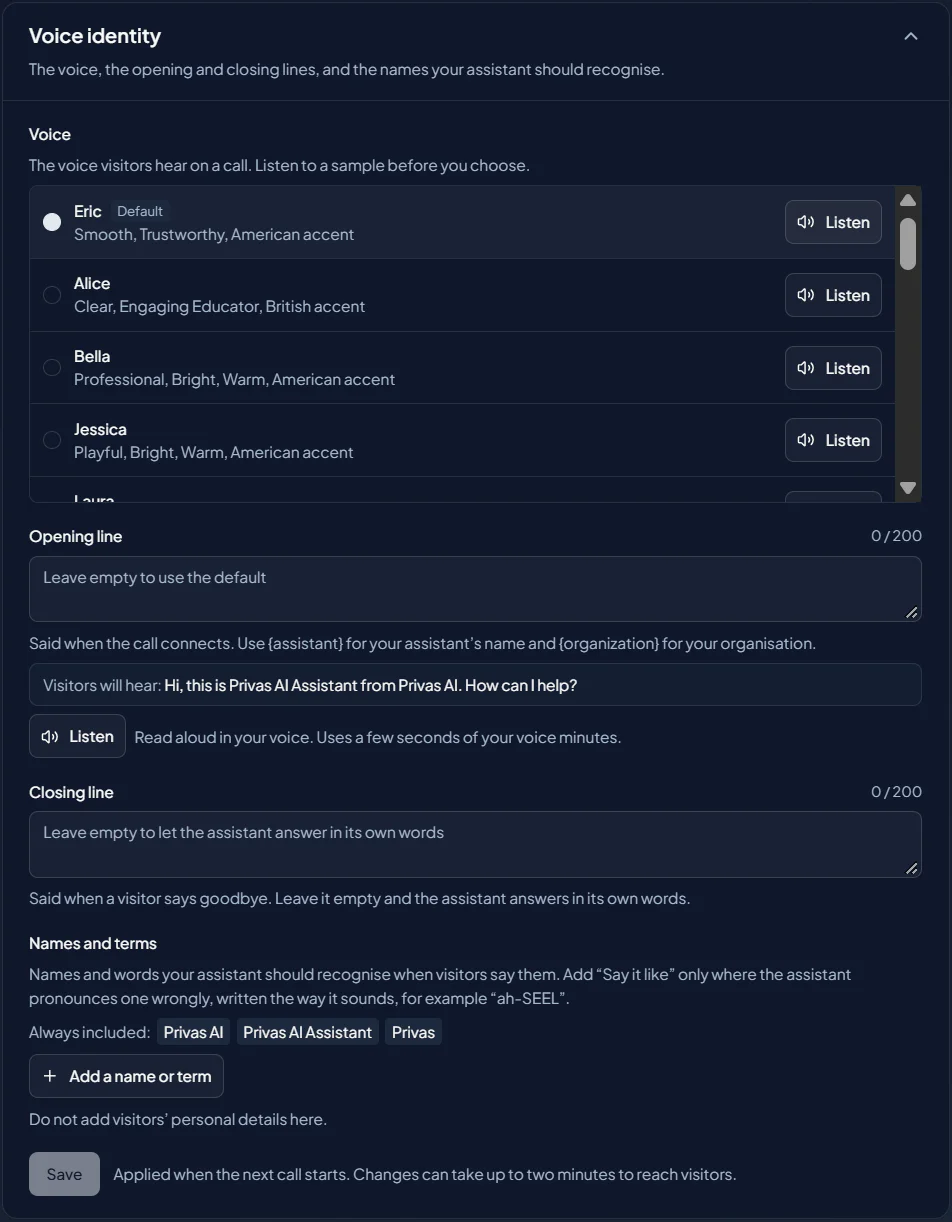
Voice
Pick a voice from the list. Press the play button beside a voice to hear a sample first. Samples are free.
Opening line
Said when the call connects. Use {assistant} for your assistant's name and {organization} for
your organisation. Leave it empty to use the default. Visitors will hear: shows the sentence
with the names filled in.
Closing line
Said when a visitor says goodbye. Leave it empty and the assistant answers in its own words.
Names and terms
List the names and words visitors are likely to say: your company, your products, your people. Your organisation's and your assistant's names are always included.
If one is pronounced wrongly, write how it sounds under Say it like, for example "ah-SEEL". Leave Say it like empty for every name that already sounds right. Do not add visitors' personal details here.
Listen
Beside the opening and closing line, Listen reads the saved line aloud in your chosen voice, so you hear exactly what a visitor will hear. It reads what is saved, not what you are typing, and uses a few seconds of your voice minutes.
Save
Click Save. Changes apply when the next call starts; a running call is never interrupted. Editors can change the voice identity.